Blog · November 2, 2026
AI Game Development Tools: What They Do and How to Use Them
AI game development tools help you make games faster by writing code, generating or editing art and sound, testing builds, and planning work. They range from small helpers that sit inside one program to full AI teams that design, build and test a game with you in a real engine. The right tool depends on whether you already know how to make games or want someone, or something, to handle the parts you cannot do yet.
This guide sorts the main kinds of tools, explains what each is good and bad at, and shows how to choose.
The main kinds of AI game development tools
Coding assistants
These sit in a code editor and suggest or write code as you type, or answer questions about your project. They are useful if you already program, because you can tell when a suggestion is wrong. If you do not code, you may struggle to judge or fix what they produce.
Art and asset tools
These create or edit images, textures, sprites and sometimes 3D models from text or sketches. They help with concept art and quick placeholders. The catch: results need cleanup to match a consistent style, and you must check the terms and licenses for anything you plan to sell.
Sound and voice tools
These generate sound effects, music or voice lines. Good for prototyping and small projects. As with art, check the license, and expect to mix and adjust what you get. Our post on sound effects for indie games covers how to get sound right.
Testing and analytics tools
Some tools use AI to play builds, find crashes, or summarize player feedback and reviews. These are most useful once a game exists and has players.
Full AI game development teams
The newest kind brings these jobs together: a group of AI agents, each with a role, working on one game. Instead of using five separate tools, you talk to one team that designs, codes, makes art and sound, tests and helps you launch.
What a full AI team looks like in practice
Suma Studios is an example of this last kind. It is a desktop app for Windows and Mac where your team works in a retro pixel-art office. You walk up to a teammate and talk, by typing or with your voice.
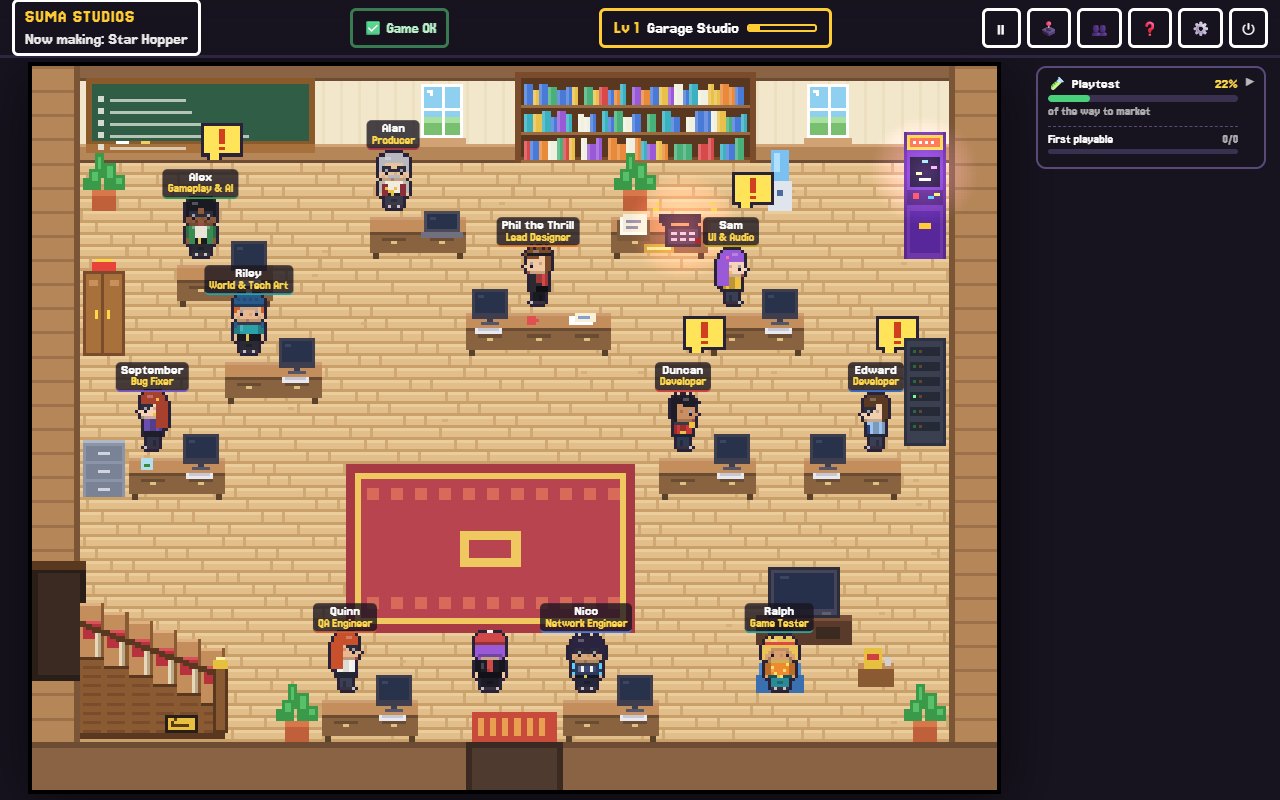
The team includes a lead designer, a producer who plans the work, developers, an art director, a sound engineer, QA, a playtester and, once the game is nearly done, marketing, publishing, live ops and community roles. They build in real engines: Godot, Unreal Engine 5, Roblox or Fortnite (UEFN). You can also open a game you already started, including Unity, GameMaker and web games, and the team builds around it.
A few tools in the office make the AI's work easy to steer:
- A chalkboard plan with every task, who has it, and the stage your game is in.
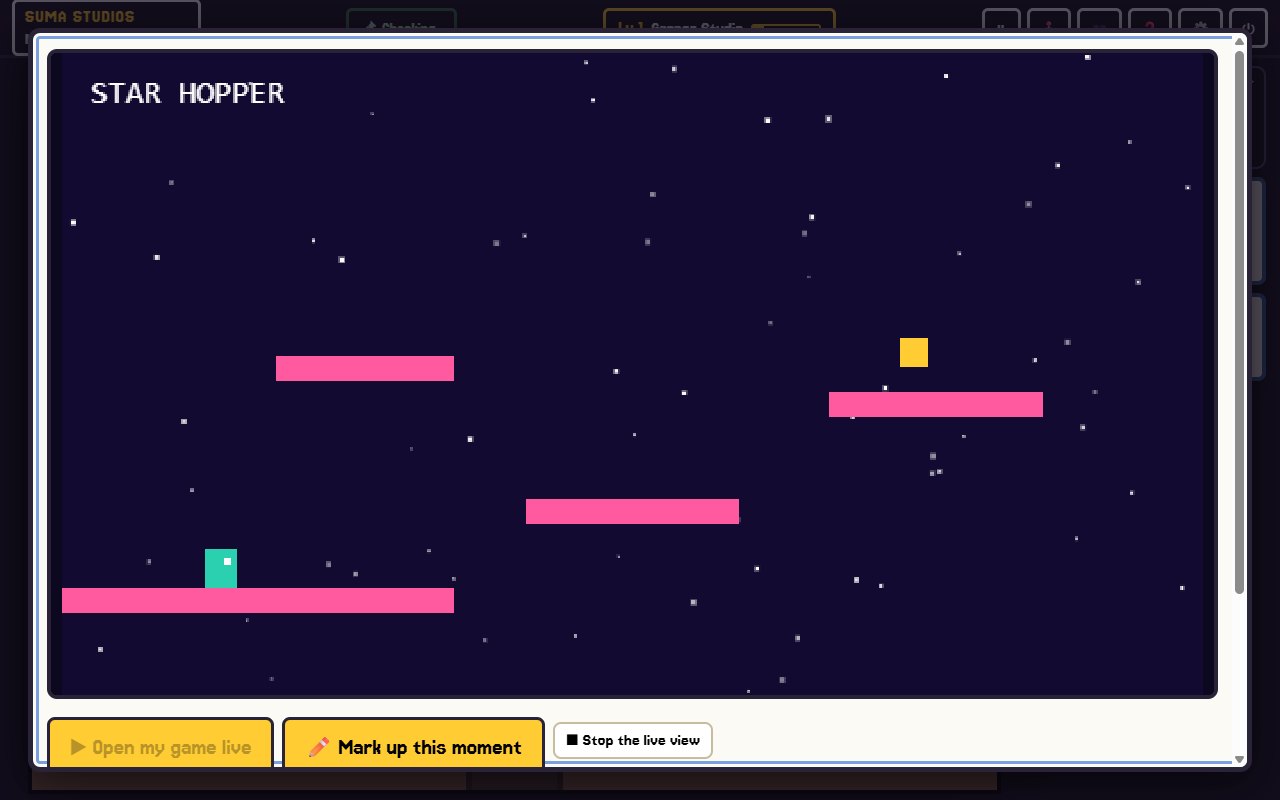
- A playtest TV where you play the game, press F8 or F9 on any moment, draw on it and say what should change.
- A design desk where you describe a change to a character or scene and the team updates the real one.
- A sound studio where you hear each sound and ask for changes.
Which AI model powers these tools?
Most AI game tools run on large language models. Some include the model in a subscription; others let you bring your own. Suma lets you choose: free local models such as Llama and Gemma on a strong PC, or your own API key from OpenAI, Anthropic or Google. Suma does not mark up AI costs, and any AI costs are between you and that company. See pricing for details.
How to choose the right AI tool
Ask yourself four questions.
- Do you code? If yes, a coding assistant may be all you need. If no, look for something that handles the code for you.
- Do you need the whole game, or one part? For one missing skill, like sound, a single tool can fill the gap. For a whole game, a team approach saves stitching tools together.
- Do you own the result? Prefer tools that leave you with a real project in a standard engine, on your own computer.
- Can you undo mistakes? AI makes mistakes. Make sure every change is saved and reversible. In Suma, every change is saved, so you can always go back, and it can back up to your own private GitHub.
What AI tools still cannot do for you
AI can write code and draw sprites, but it cannot decide what your game is about or know what makes it fun for your players. You still need to:
- Play your game often and say clearly what feels wrong.
- Keep the scope small enough to finish.
- Test with real people.
- Check licenses and make sure AI-made work fits how you plan to use it.
For a deeper look, read can AI make a video game?
FAQ
Are AI game development tools free?
Some are. Many charge a subscription or per-use fee for the AI model. With Suma, the app is a $14.99 one-time purchase, and you can run free local models on a strong PC, or use your own API key.
Can beginners use AI game development tools?
Yes, and some are built for beginners. Look for ones that let you work in plain words and show you results you can play.
Do AI tools replace game developers?
Not in our view. They speed up a lot of the work, but a game still needs a person with a vision making the calls and judging what is fun.
Will my game be stuck inside the AI tool?
It depends on the tool. Suma builds a real engine project on your own computer, so you can open it in that engine at any time.
See an AI team at work
If you are curious what building a game with an AI team feels like, read the features page, or try Suma free with one game up to its first playable version.
Make your game with an AI team
Suma Studios is a pixel-art game studio on your computer. Tell your team what you want, and they build it in Godot, Unreal, Roblox or Fortnite.